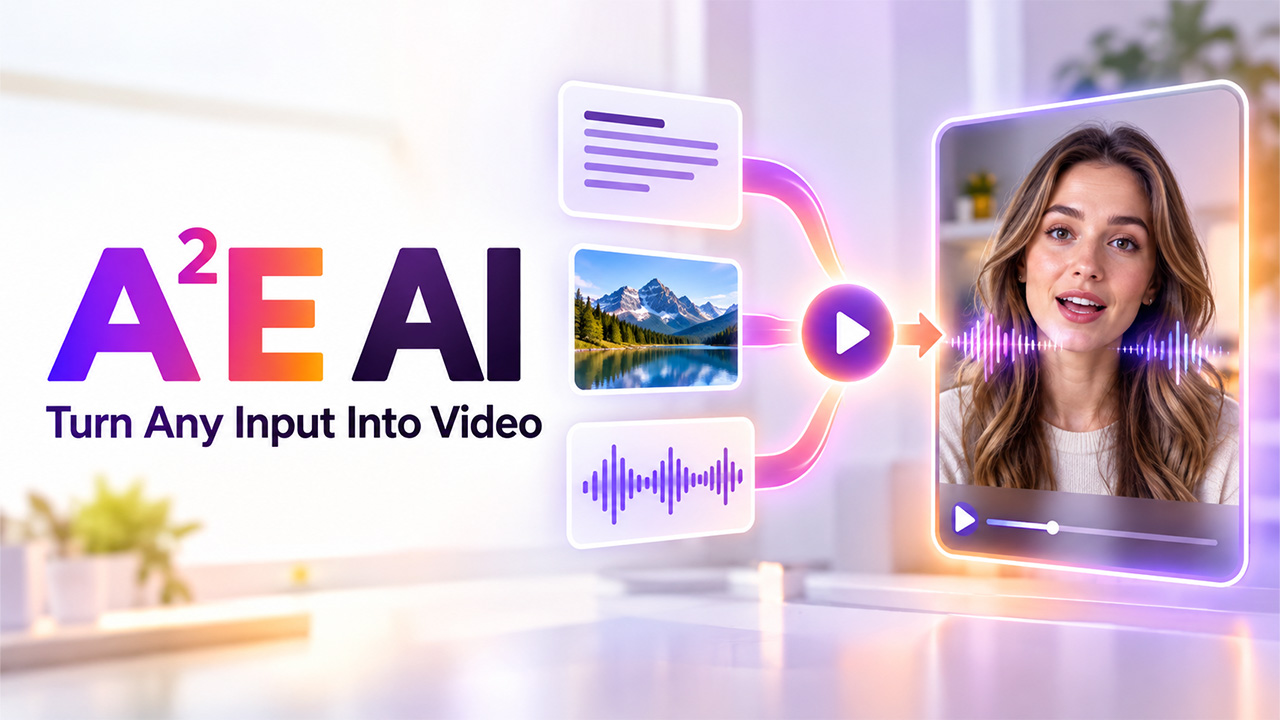
If you’ve been looking into AI-powered video creation tools, you’ve probably come across A2E AI at some point. It’s a browser-based platform built around turning text, images, or audio into video content, using AI avatars, lip-syncing, and voice cloning to do most of the heavy lifting.
What sets it apart from most other players is flexibility. Rather than restricting you to only one method of production, it caters to many kinds of inputs, which means that regardless of whether your content starts as a script, a picture, or an audio file, you can still end up with a video product without filming at all.
In this blog, we’ll walk through what A2E AI actually offers, who it’s built for, what it costs, and where it fits if you’re comparing it against other AI video platforms out there.
What Is A2E AI?
A2E AI is an AI-powered video generation platform focused on turning static content into dynamic video output, primarily through digital avatars, lip-syncing, and voice cloning. This software is designed to enable scalable and repetitive video creation processes, which, in the past, would take much more time due to the need for a camera and an editor.
The working principle of A2E AI revolves around the creation of a personalized avatar that will be responsible for creating lip-synced video based on different scripts or scenarios. Since there is no need to record anything on the spot, organizations can create a significant amount of video content without renting out a studio or hiring new talent for each project.
In other words, it is not just video editing software, but rather a video generation infrastructure that enables developers to use an API for implementing avatar-led video generation within their own software.
How Does A2E AI Work?
A2E AI follows a relatively simple workflow: you provide the content or assets you want to turn into a video, choose the appropriate generation option, and let the platform handle the production process. Depending on the workflow, this can involve an avatar, an image, a script, a voice, or a combination of these inputs.
Start With Your Content
The first step is deciding what you want to create. You can work with an image, written content, an avatar, or an audio source depending on the type of video you need. This makes the platform useful for different production workflows rather than forcing every project into the same format.
Choose the Generation Method
After adding your source material, select the workflow that matches your project. For example, an image can be animated into a video, while an avatar can be paired with a script and voice to create a talking presentation. A2E also provides developer-focused APIs for integrating media generation into other applications.
Customize the Output
Your instructions can influence how the generated content looks or behaves. For image-to-video generation, prompts can describe the desired movement and visual action, while other workflows allow you to work with voices, avatars, and lip-syncing.
This is also where Kling AI Video and similar AI video workflows can become relevant for creators who want to explore different approaches to generating or enhancing visual content.
Generate and Review
Once the required settings are selected, A2E processes the request and generates the video. The result should be reviewed before publishing because AI-generated content can still require adjustments to movement, facial expressions, timing, voice delivery, or other visual details.
Refine the Final Result
The first generation does not always have to be the final version. If the result does not match your expectations, you can adjust the prompt, source material, or generation settings and create another version. This iterative approach is particularly useful when consistency and presentation quality matter.
Overall, A2E AI turns several traditionally separate production steps into an AI-assisted workflow. Instead of recording every piece of content manually, creators can combine digital assets, generated visuals, avatars, and voices to produce videos more efficiently.
Key Features
Here’s what actually defines the A2E AI toolkit once you’re using it for real projects:
- AI avatar video generation: Make realistic digital avatars that have precise lip-syncing features, suitable for scalable video content creation.
- Image-to-video generation: Convert static images to video format, helpful when creating animated video content from one image without the need to shoot videos.
- Voice cloning: Generate a voice sample using AI based on audio, working together with avatar creation in generating videos.
- Multilingual lip-sync: Provides lip-sync for over 50 languages, suitable for teams that generate content for global customers.
- High-resolution output: Produces videos in 4k resolution, a big improvement over other competing software that limits output to 720p or 1080p resolution.
- API access: Allows developers to integrate avatar generation and video production within their applications using A2E’s API.
For teams building this into a broader AI business solutions stack, avatar-led video works well for onboarding content, product demos, and training material, cutting down the time and cost of traditional video production considerably.
Who Uses A2E AI?
A2E AI attracts a fairly specific mix of users, mostly people who need video content produced quickly and repeatedly, without the overhead of a traditional production process:
- Marketers: Producing on-brand video content at scale for campaigns, ads, and social media, without booking new shoots for every variation.
- Educators and e-learning teams: Building consistent avatar-led training content and course material that can be updated by editing a script, not re-filming.
- Developers: Incorporating avatar-based video creation directly into apps and products via API as opposed to using the platform independently.
- Content creators: Producing short-form video at a pace that wouldn’t be realistic with traditional filming and editing, similar to the workflow creators get from tools like PixVerse AI.
- Businesses and agencies: Making a high volume of video either for onboarding processes, demonstrations of their products, or campaigns.
The factor that unites all of these is scale. Whether it’s one video a week or dozens, the appeal is being able to produce consistent, on-brand content without the time and cost that traditional video production usually demands.
Pricing
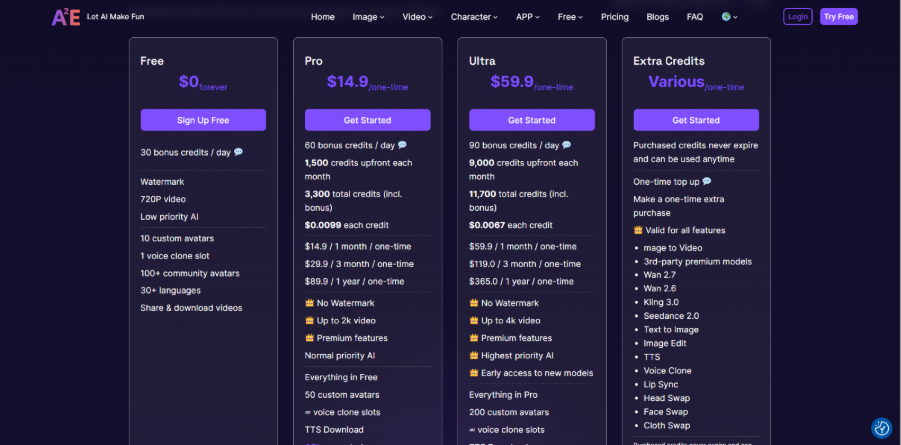
A2E AI pricing is simple, with four different plans: Free, Pro, Ultra, and pay-as-you-go extra credits, so that you can get started with something free and only upgrade when your needs grow. Here’s exactly how the plans break down:
The Free plan is, of course, free but requires no credit card to use. It provides 30 bonus credits to use. It provides 30 bonus credits per day, which gives you enough credits to try out 10 unique avatars, one voice clone slot, and 100+ community avatars in 30+ languages. The disadvantage here is the watermark on every video made, limited resolution to 720p, and lower-priority processing in case of heavy workloads.
The Pro plan costs $14.9 for one month, $29.9 for three months, and $89.9 for a full year, and removes the watermark from videos, allows 2k video output, offers premium features, and provides 60 bonus credits per day plus 1,500 credits upfront each month, with an approximate price of $0.0099 per credit.
The Ultra plan is the top tier, priced at $59.9 monthly, $119 for three months, or $365 annually. The plan boosts video output to 4k, provides 90 bonus credits per day, has 9,000 credits upfront monthly, and makes its price equal to $0.0067 per credit.
Tips for Creating Better Videos With A2E AI
Getting useful results from an AI video generator is not only about choosing the right model or plan. The quality of the source material, instructions, voice, and final review can all affect the finished video. A few simple practices can make the workflow more consistent.
Start With a Clear Script
If your project includes an AI avatar or voice narration, prepare the script before generating the video. Keep sentences natural and avoid unnecessarily long lines. A clear script makes it easier to maintain a steady rhythm and reduces the need for repeated generations.
Use High-Quality Source Images
When creating video from a still image, start with a clean source that has the subject clearly visible. Poor-quality or heavily compressed images can make it harder to achieve a convincing result.
Give Specific Instructions
Instead of using vague prompts, describe the action, movement, framing, and overall visual direction you want. Specific instructions give the generation system more information to work with and can reduce unwanted results.
Review Voice and Lip-Sync Quality
For avatar-based content, watch the generated video carefully rather than assuming the first result is ready to publish. Check pronunciation, timing, facial movement, and lip synchronization. If something looks unnatural, adjust the source or settings and generate another version.
Leave Time for Final Editing
AI generation can speed up production, but it does not eliminate the need for human review. Trimming unnecessary parts, improving pacing, adding captions, or adjusting the final presentation can make the finished video more suitable for its intended audience. Applying practical Video Editing Tips after generation can also help turn an AI-generated clip into a more polished piece of content.
Test Before Scaling
If you plan to produce videos regularly, create a few test versions before committing to a large production workflow. This lets you understand credit usage, output consistency, generation time, and the amount of editing each project may require.
A2E AI can make video production more accessible, but the best results still come from combining AI generation with clear creative direction and human quality control.
Pros and Cons of using A2E AI
Here’s the honest weigh-up once you’ve spent real time with A2E AI:
- Genuinely usable free tier: 30 Daily credits and access to community avatars mean you can test real output before paying anything.
- Strong value at higher tiers: The Ultra plan’s per-credit cost drops noticeably, making it a solid deal for high-volume users.
- Multilingual support: 30+ languages for lip-sync makes it a realistic option for teams producing content for global audiences.
- API access for developers: Avatar generation can be built directly into other products, not just used through the platform’s own interface.
- Watermark and resolution caps on free tier: 720p output and a watermark limit how usable free-tier videos are for anything public-facing.
- Credits don’t roll over on subscriptions: Unused daily or monthly credits are typically lost at the end of the cycle, unlike purchased top-ups.
- Output quality can vary by prompt: Like most AI video tools, results aren’t always consistent on the first attempt, occasionally requiring a few tries to get something usable.
For teams specifically comparing avatar quality across platforms, it’s worth seeing how a different approach, like Google Gemini Avatar Tool, stacks up before settling on one tool for the long run.
Conclusion
Ultimately, A2E AI is included among other AI video solutions because it pays attention to what counts regarding scaling, avatar generation, lip-syncing, and voice cloning that work together without needing a traditional production setup. The free trial is useful for checking how the tool works, while credit-based pricing works pretty fine as long as you understand how much you will use it.
And it may not suit everybody’s requirements. Those teams who require long video formats or the best-in-class video in one go could face limitations sooner than expected. However, for those teams who are looking for on-brand video content that can be produced within a limited time frame, the tool is very suitable.
When you wonder whether it’s worth implementing A2E AI into your workflow, the only right choice here would be to try its free trial version.
Frequently Asked Questions (FAQs)
-
Q. Can A2E AI create videos from images?
Yes. A2E AI supports image-to-video generation, allowing users to provide a still image and use prompts to describe the movement or action they want to create. The platform’s developer documentation also provides an image-to-video API for this workflow.
-
Q. Can I create a custom AI avatar with A2E AI?
Yes. A2E AI supports custom avatar creation as part of its avatar-focused workflows. The available plans include different limits for custom avatars, while the platform also provides APIs for developers who want to build avatar functionality into their own applications.
-
Q. Does A2E AI offer voice cloning?
Yes. Voice cloning is available through A2E AI, allowing users to create a custom voice from an audio sample for use in supported video and audio workflows. A2E also provides a dedicated voice-clone API for developers.
-
Q. Can A2E AI be used for business video production?
Yes. A2E AI can be used for workflows such as training content, product presentations, marketing videos, avatar-based communication, and other repetitive video production tasks. Its API is also designed for businesses and developers that want to integrate AI media generation into their own applications.
-
Q. Does A2E AI require video editing after generation?
Not necessarily, but reviewing and editing generated videos can improve the final result. Depending on the project, you may want to trim sections, adjust pacing, add captions, correct timing, or combine multiple clips before publishing. AI generation can reduce production work, but human review remains useful for quality and consistency.