Introduction
Transforming an idea into an operational interface has long included mockups, wireframes, and repeated handoffs between design and development teams. Stitch AI reduces this path. Built within Google Labs, it allows users to describe a website or an app in natural language and get high-fidelity UI designs in return.
The platform has evolved well beyond a standard prompt box. It now operates as an AI-powered design canvas that provides support to vibe design, a method where users begin from an objective or a feeling instead of a wireframe. In this blog, let us cover what this tool is, its main features, how you can get started, and the limitations you can be mindful of.
What Is Stitch AI?
Google Stitch refers to an AI-native and experimental design platform from Google Labs. It converts ideas into interactive prototypes and high-fidelity user interfaces, and it creates user interfaces for both web and mobile applications.
Google has announced the platform’s evolution and turned it into an AI-powered software design canvas on 18th March 2026. Users can start with a business goal, the feeling they want users to have, or examples that make them feel inspired, instead of starting from a wireframe.
Stitch AI helps different types of users:
- Professional designers who want to quickly explore different variations.
- Founders converting a first idea of software into visible screens.
- Developers and product managers who need layouts that they can test early on in a project.
Stitch has become more upgraded with different Gemini AI models. Faster Flash variants manage fast ideation, while sophisticated variants manage multimodal inputs and complex layouts.
What Are the Main Features of Google Stitch?
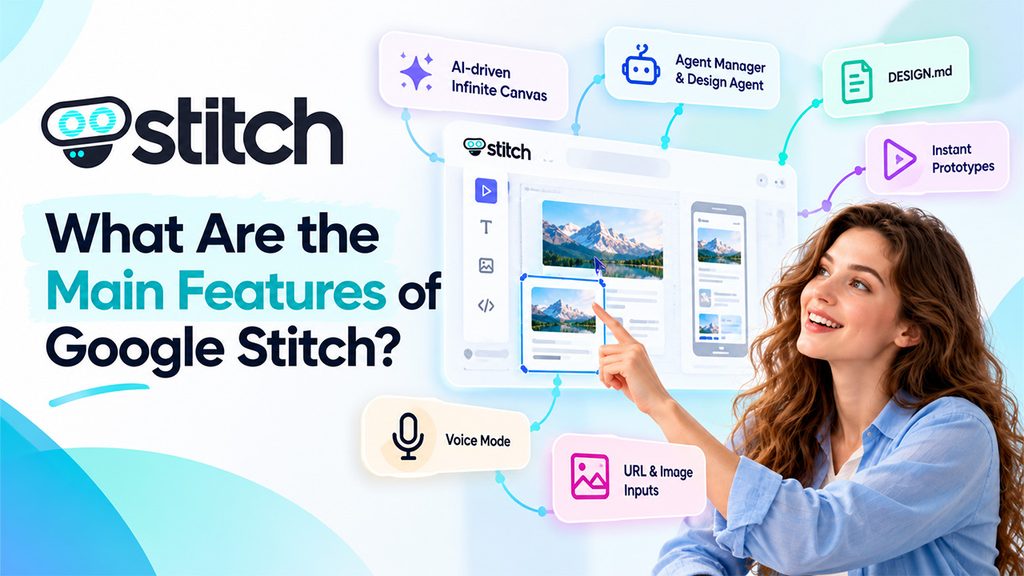
The newest version of the platform centralizes collaboration, design, and developer handoff tools. Let us see a few capabilities:
- AI-driven Infinite Canvas: Text, Images, or even code can be included as context, providing more space for ideas from early concepts to working prototypes.
- Agent Manager and Design Agent: The design agent reasons across the complete evolution of the project, while Agent manager keeps track of progress and provides support to numerous ideas in parallel.
- DESIGN.md: A markdown-file which is agent-friendly is utilized to import or export design rules between Stitch projects and other coding or design tools. A design can also be extracted from any URL.
- Instant prototypes: You can also connect the screens and preview it with the help of a Play button. The platform can also create logical next screens with the help of just a click.
- Voice Mode: Users can directly speak to the canvas, get design critiques in real-time, and request changes.
- URL and Image Inputs: You can upload a screenshot or wireframe for recreation, and a current website can be redesigned by providing the URL.
- Developer Connections: An SDK, a Stitch MCP server, and skills that allow other platforms to utilize its capabilities.
Options for Export and Handoff
Once your design is ready, Stitch AI provides different ways to push it forward:
- Export to Google AI Studio
- Copy the HTML of a single screen
- Export to Figma as editable design files
- Download a .zip package with HTML files and image assets
- Send the project to Jules, a GitHub-based workflow
- Share design context through MCP.
- Create a project brief in a format of PRD-style.
Google has also listed Antigravity among the tools that developers use where the design can be exported. The best option relies on whether the next step is for design or developer.
How to Use Stitch AI?
Get started with Stitch AI by implementing the following steps:
- Launch stitch.withgoogle.com, select “Try Now,” and log in with the help of a Google account.
- Select between mobile and web. After that, use a prompt, upload a wireframe or image, or start a sample project.
- Fine-tune the result on the canvas via element-based edits, chat-based edits, or a DESIGN.md file. Different screens can be chosen with Shift and clicked to apply the changes across all of them.
- Go to Instant Prototype to check the flow and make changes to how screens connect.
- You can export the work to code, Figma, AI Studio, or another tool.
Before creating designs, it is also helpful to open Settings and check out the Allow AI model training toggle, which controls whether interactions may be utilized to train models of Google. Usage limits also become visible in the same place.
Clear prompts create a higher level of output. A detailed Stitch AI prompt mentions the business objective, the intended feeling of user, and any visual inspiration. Ideas can then be fine-tuned beforehand with the help of an assistant like AISuites’ AI chat, and supporting visuals can be created with the help of an image generation tool.
Limitations You Can Consider
The platform is still in the experimental stage. Let us see a few limitations of Stitch AI you can keep in mind:
- There can be slight lagging in the process. Thus, it is not always instant.
- A small edit can cause modification in parts of the design that were not meant for change.
- Text styles, colors, and components can drift across different screens as your project develops.
- Designs created from uploaded references can feel slightly fragmented, with no coherent navigation logic.
- Exported HTML operates as a design reference and often requires major rework before production.
- Figma export is a lot cleaner, but it can remove the code layer.
If limitations have made you change your mind about Stitch AI, then you look for a few alternatives like Runable AI, Bolt, Lovable, Framer Design Pages, and UX Pilot.
Conclusion
Stitch AI provides founders, designers, and developers with a practical way to turn simple text ideas into interactive prototypes, editable screens, and exportable assets. By following the 7 Essential UX Design Principles, designers can create more intuitive, user-friendly interfaces while making better use of AI-generated designs. Its design agent, canvas, voice mode, DESIGN.md support, and export options make it a useful starting point for early-stage UI projects. Rather than treating it as a finished product, consider it a tool for ideation and first drafts. Used effectively, Stitch AI can save considerable time during the initial stages of the design process.
Frequently Asked Questions :
What is Stitch AI?
Stitch AI refers to an experimental design platform from Google Labs that converts natural language prompts into interactive prototypes and high-fidelity UI designs for mobile and web apps.
Which type of users Stitch AI attracts?
Founders, developers, professional designers, and product managers can leverage it to explore variations in design, convert ideas into screens, and check layouts early on in the project.
What are the key characteristics of Google Stitch?
Main features involve an AI-powered infinite canvas, a design agent with Agent Manager, instant prototypes, DESIGN.md support, URL, voice mode, and image inputs.
Do I have the option to export designs from Stitch AI?
You can export to Google AI Studio, Figma, or Jules. Just copy the HTML of screen, download a .zip folder with image assets and HTML files, or share design context with the help of MCP.
What are the common limitations of Stitch AI?
It is still in the experimental stage; it can change unintended parts of a design after minor edits; it is experimental, and also, it can show style drift across different screens.